03 · Action Deck
Start from Default. Prove GO / STOP / House / Bits on Action Deck — load Blue Lamp — Theater Show if a show list has it, or build the minimum yourself. Fresh Community does not guarantee a seeded sample deck.
Captures (target layout)
These stills show a finished Blue Lamp Theater sample layout — match the page-1 tile names; do not assume the demo box is preloaded.
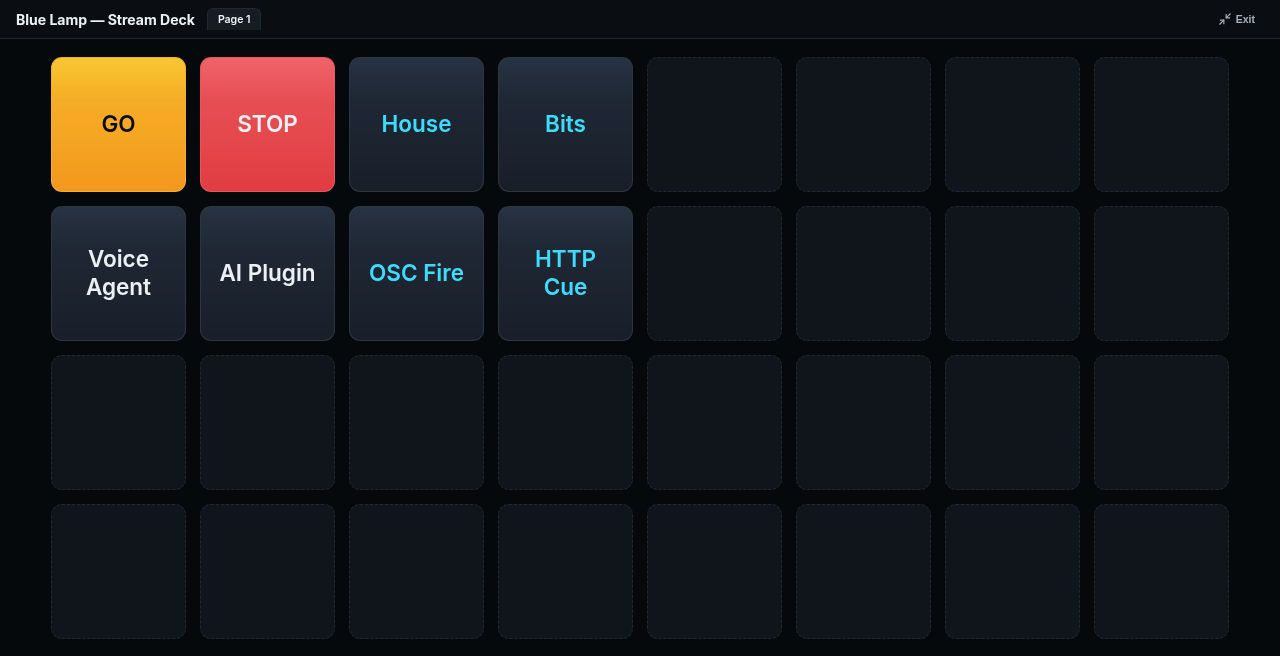
Target page 1 for the Blue Lamp Theater walkthrough: GO, STOP, House, Bits (Voice / AI / OSC / HTTP optional)
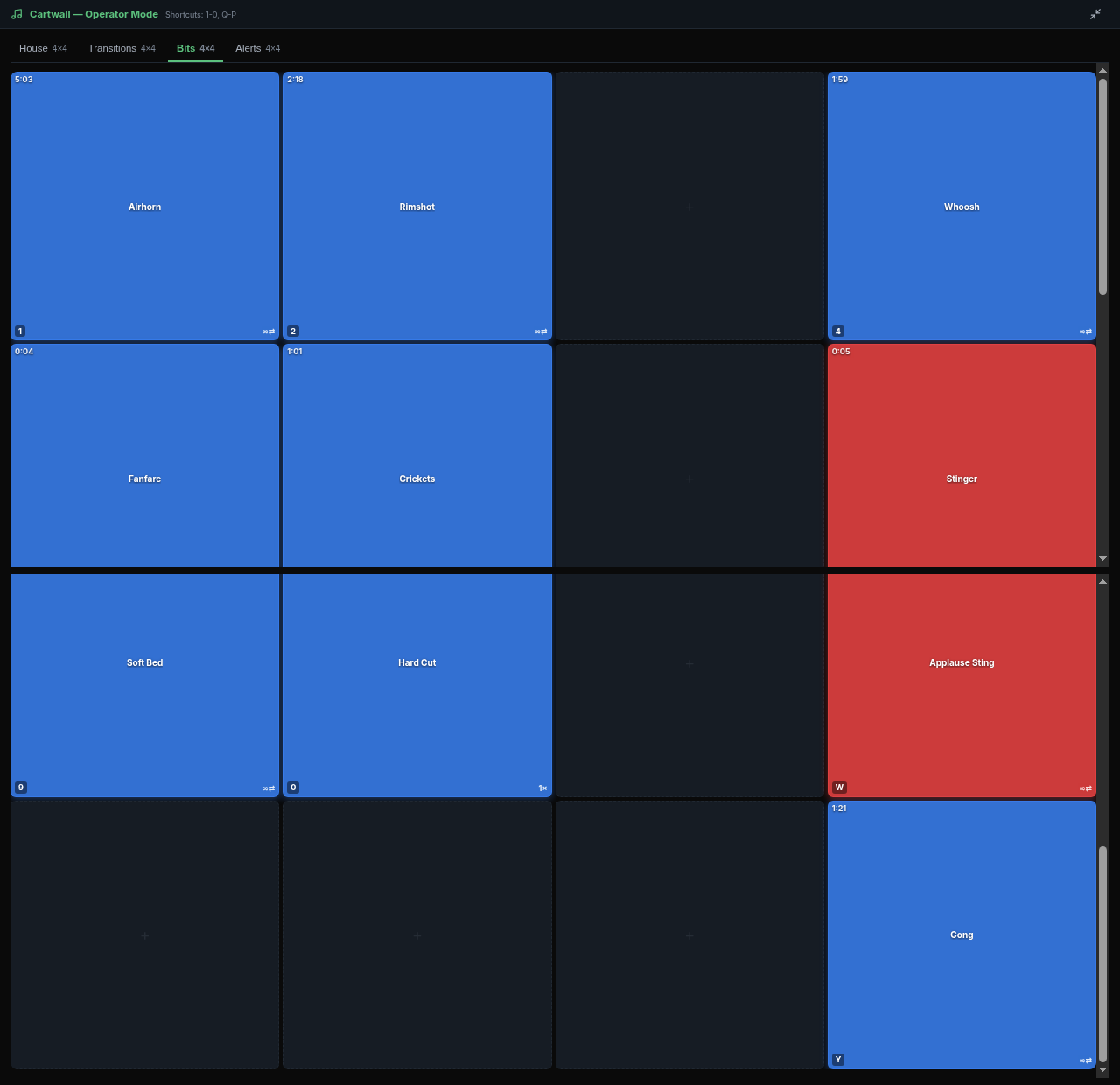
Target Bits cartwall — fire at least one tile cleanly
Before you start
- Steps 01–02 done.
- Page-1 openers are House and Bits — not “Cartwall 1 / 2”.
- Reference: Control.
- Fresh Community 1.0.190 starts with an empty audio library — upload at least one short clip before you can play SFX. Optional CDN samples: sample-sting-a.wav / sample-sting-b.wav, or bring your own
.wav/.mp3/.zip.
Steps
A · Show list has Blue Lamp — Theater Show?
- If a show/sample list is visible and lists Blue Lamp — Theater Show (or a Blue Lamp Theater sample), load it, then skip to C · Fire.
- Otherwise stay on Default and continue with B · Build.
B · Build a minimal Action Deck from Default
Chrome below is 1.0.190 (Community Free). Stay on Default. Create cartwall pages before any Navigate-to-cartwall action.
- Cartwall first: Open Control → Audio → Cartwall (Cartwall is a sibling tab under Audio — not nested under Library). Create House and Bits cartwall pages. Do this before Action Deck navigate wiring — those pages must exist first.
- Library Upload before Play-an-audio-file: Fresh 1.0.190 ships with an empty show audio library. Open the sibling tab Control → Audio → Library. Empty state reads: “No clips in this category. Use Upload to add audio files.” Click the primary Upload button → modal Upload audio. Drop zone: “Click here to select file or drag files into this area to upload” (mp3 / wav / zip). Upload at least one short file — first-timers can optionally download sample-sting-a.wav or sample-sting-b.wav from the CDN, then Upload that file; bring-your-own short
.wav/.mp3/.zipis equally valid. Until a clip is in Library, a Bits tile’s Play an audio file picker is empty — you cannot fire “Airhorn” (or any sting) yet. Do not use Cloud SFX Add to Library for this step. - On the Bits cartwall page, add at least one fireable tile (label it e.g. Airhorn if you like — that name is yours). Wire the tile to Play an audio file and pick the file you just uploaded — not a catalog that is not there yet.
- Open Control → Action Deck. Create or name a deck if needed (empty Default deck is fine) — e.g. Page 1 or Blue Lamp — Theater Show.
- Add each page-1 button (GO, STOP, House, Bits) the same way:
- Click an empty cell.
- In the inspector, click Add button (not “Add tile”).
- Set the Label field to
GO,STOP,House, orBits. - Scroll to Actions → event tab Press → Add action.
- Wire the Press actions:
- GO / STOP: pick any catalog command (a no-op is fine — you only need Press to prove the button). Under Style, make GO amber and STOP red.
- House / Bits (page openers): Add action → Navigate pages → Go to dynamic page… (cartwall, timecode, plugins) → pick the House or Bits cartwall page you created in step 1.
- Optional later (do not block): Voice, AI, OSC, HTTP.
- Do not expect a paired hardware Stream Deck layout until you create or pair one yourself.
C · Fire
- From Action Deck page 1, fire GO, then STOP. Watch Overview / the graph react.
- Press House — cartwall page opens (not blank).
- Press Bits — Bits page opens; fire the tile that plays your uploaded Library file (local is fine; a network audio device is step 04).
- Optional: tap Voice / OSC only if you wired them in 02.
Checks
| Tile / page | Expect |
|---|---|
| Audio library | At least one short file via Library → Upload (CDN sample or bring-your-own) — not Cloud SFX Add to Library |
| GO → STOP | Graph reacts; take and halt are obvious |
| House | Opens House cartwall (not a blank page) |
| Bits | Opens Bits; tile fires the uploaded file |
| Page 1 labels | House / Bits — never Cartwall 1 / 2 |
No local audio device?
That’s OK. Skip hearing on this box, or send cartwall SFX to a network audio device (AES67, ST2110, Sonos, garden speaker, etc.) under I/O — continue with step 04.